


Description
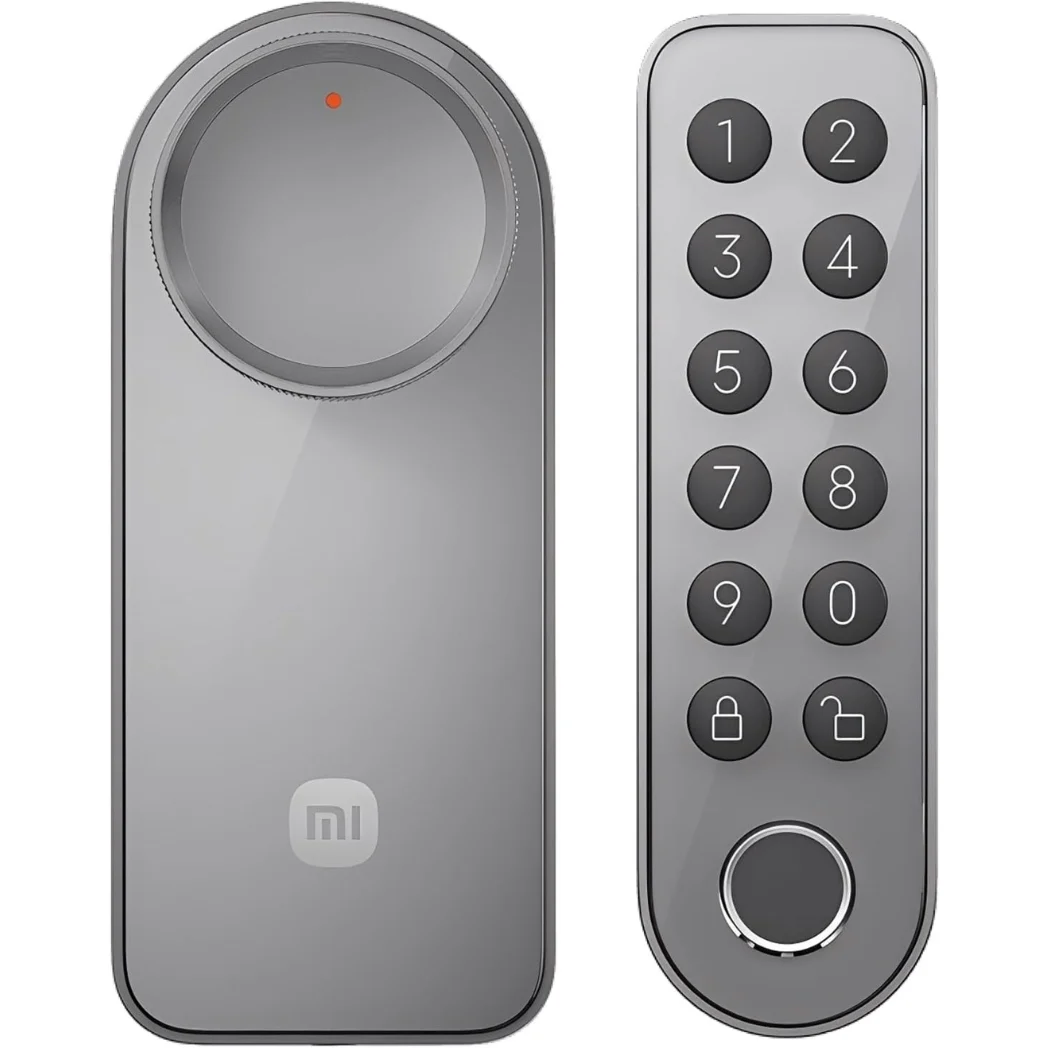
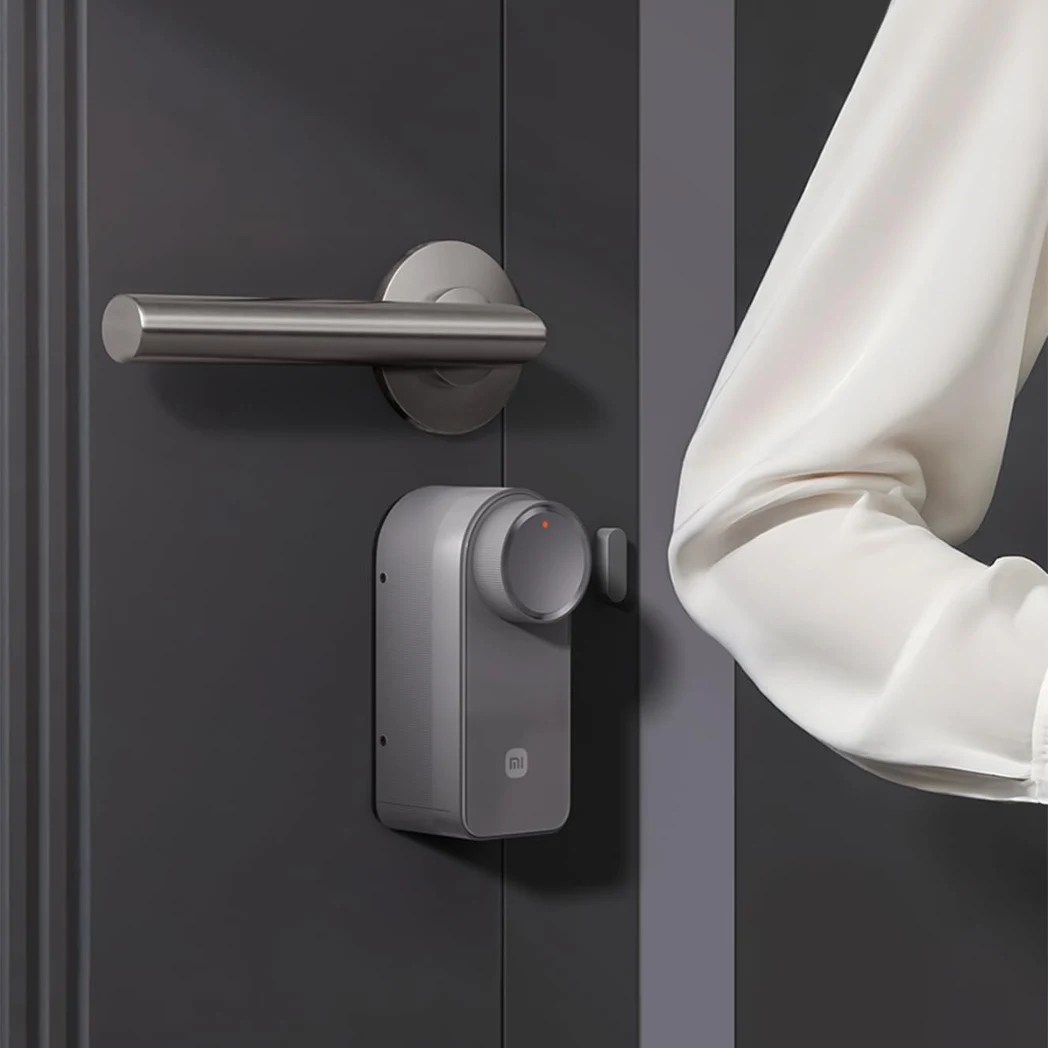
The Xiaomi Self-Install Smart Lock with Keypad converts a compatible mechanical door lock into a connected access-control system without replacing the complete lock body. The internal motor turns the existing key or thumbturn, while the external keypad adds fingerprint and password entry for family members, guests and approved visitors.
Direct Wi-Fi, Bluetooth 5.0, Xiaomi Home and Matter support provide local and remote control without requiring a separate Xiaomi gateway. The system is best understood as three connected components: the indoor motorised lock, the outdoor fingerprint keypad and the digital access rules created by the owner.
Technical Specifications
| Specification | Details |
|---|---|
| Brand | Xiaomi |
| Product Name | Xiaomi Self-Install Smart Lock with Keypad |
| Lock Model | XMZNMSEU2LD |
| Keypad Model | XMZNMSKP1LD |
| Product Type | Retrofit Smart Door Lock |
| Region | EU Version |
| Lock Material | V0-Grade Fire-Resistant ABS and PC |
| Unlocking Methods | Fingerprint, Permanent PIN, Periodic PIN, One-Time PIN, Bluetooth, Remote App Control, Voice Control and Mechanical Key |
| Fingerprint Technology | Semiconductor Fingerprint Recognition |
| Tested Fingerprint Recognition Rate | Up to 99.3% Under Xiaomi Test Conditions |
| Virtual Password | Supported |
| Lock Battery | Rechargeable Lithium-Ion Battery |
| Lock Battery Capacity | 2450mAh |
| Battery Voltage | 7.2V DC |
| Claimed Lock Battery Life | Up to 6 Months Under Xiaomi Test Conditions |
| Lock Charging Port | USB Type-C on Removable Battery Pack |
| Recommended Charging Input | 5V / 2A |
| Approximate Charging Time | 3–5 Hours |
| Keypad Battery | 2 × AA Alkaline Batteries |
| Claimed Keypad Battery Life | More Than 10 Months Under Test Conditions |
| Wi-Fi | IEEE 802.11 b/g/n/ax, 2.4GHz Network Required |
| Bluetooth | Bluetooth 5.0 |
| Thread | IEEE 802.15.4 |
| Smart Home Support | Xiaomi Home and Matter |
| Compatible Systems | Android 8.0 or iOS 12.0 and Above |
| Keypad Protection | IP65 Dust and Water Resistance |
| Lock Water Resistance | Not Waterproof; Indoor Side Installation Only |
| Operating Temperature | -10°C to 55°C |
| Operating Humidity | 0–93% RH, Non-Condensing |
| Lock Dimensions | 141 × 60 × 59mm |
| Lock Weight | Approximately 538g |
| Keypad Dimensions | 133 × 40 × 29mm |
| Keypad Weight | Approximately 147g |
| Cybersecurity Standard | European EN18031 Certification |
The System Has Three Separate Security Layers
| System Layer | Location | Main Responsibilities |
|---|---|---|
| Motorised Lock | Inside the Door | Turns the existing key or thumbturn, detects lock status and provides the interior lock/unlock button |
| Fingerprint Keypad | Outside the Door | Accepts fingerprints and passwords and provides anti-tamper monitoring |
| Xiaomi Home Control | Smartphone and Connected Ecosystem | Manages access, reviews logs, sends alerts and controls remote functions |
The existing mechanical lock remains part of the door. The Xiaomi unit controls it from the interior rather than replacing the complete cylinder, handle and mortise system.
Other connected entry, lighting and household-control products are available in the AS2 Smart Home gadgets collection.
Assign the Right Credential to Each Person
A secure setup does not require every person to use the same fingerprint or permanent password. The available access methods can be assigned according to each user’s role.
| User Type | Recommended Access | Reason |
|---|---|---|
| Primary Owner | Fingerprint, Xiaomi Home and Mechanical Key | Provides fast daily access, administrative control and an offline backup |
| Adult Family Member | Individual Fingerprint or Permanent PIN | Creates identifiable access without sharing the owner’s credentials |
| Child or Older Family Member | Individual PIN with Key Backup | Useful when fingerprints are difficult to recognise consistently |
| Regular Cleaner or Caregiver | Periodic Password | Limits access to an approved date or time period |
| One-Time Visitor | One-Off Password | Provides temporary entry without creating permanent access |
| Trusted Emergency Contact | Securely Stored Mechanical Key | Provides entry if the battery, network or electronic system becomes unavailable |
Check Door Compatibility Before Ordering
The term “self-install” means the system can be mounted without replacing the complete lock, but it does not mean that every cylinder and door is compatible.
| Compatibility Check | Requirement |
|---|---|
| Supported Lock Types | Euro cruciform, Euro profile, Scandinavian profile, UK oval, Euro thumbturn and compatible UK mortise sash locks |
| Unsupported Examples | Swiss lock cylinders and ASSA 2000 configurations |
| Key Thickness | 5mm or Less |
| Visible Key Length | 37mm or Less After Insertion |
| Emergency Cylinder Function | The outside key must still work while a key remains inserted inside |
| Thumbturn Installation | The existing thumbturn must be removable and match one of the eight supplied adapters |
| Inward-Opening Door Clearance | At Least 35mm |
| Outward-Opening Door Clearance | At Least 50mm |
| Wi-Fi Network | A 2.4GHz network must be available near the door |
| Interior Environment | The motorised lock must remain indoors and protected from water |
A buyer should confirm the cylinder type, available clearance, key dimensions and emergency-key function before opening the installation accessories.
Installation Is Completed Through Four Checkpoints
Checkpoint 1: Confirm Mechanical Movement
Lock and unlock the door manually several times before installation. The cylinder should rotate smoothly without requiring excessive force. A stiff or misaligned mechanical lock should be repaired before adding a motorised controller.
Checkpoint 2: Select the Correct Mounting Method
If the cylinder projects at least 3mm from the door surface, the supplied bracket can be secured around it. Cylinders with less projection may require the supplied spacer, double-sided adhesive and adhesion promoter.
Checkpoint 3: Match the Key or Thumbturn
For a key-operated cylinder, the key remains inserted inside the door and connects to the motor. For a removable thumbturn, one of the eight included adapters must fit securely and rotate the cylinder without slipping.
Checkpoint 4: Bind and Calibrate
After mounting the lock and keypad, add them to Xiaomi Home and complete the calibration process. Calibration teaches the motor the correct locked and unlocked positions and must not be skipped.
What Happens in Common Entry Situations?
| Situation | System Response | Owner Action |
|---|---|---|
| A Family Member Arrives | The keypad accepts the registered fingerprint or PIN and the app can send an arrival notification | Review or disable arrival alerts according to household preferences |
| A Guest Needs Temporary Entry | A periodic or one-time password can provide limited access | Confirm that the credential has the correct validity period |
| Several Incorrect Codes Are Entered | The keypad can trigger an alert and temporarily lock input after the configured limit | Review the activity log and confirm whether the attempt was expected |
| The Keypad Is Removed | The hidden anti-tamper switch can activate an audible warning and app notification | Inspect the keypad and mounting surface |
| A Duress Fingerprint Is Used | The door unlocks while the app sends an abnormal-access alert | Follow the household’s pre-arranged security response |
| The Door Is Left Open | The app can send a warning when the magnetic sensor detects the open state | Confirm that the door sensor is installed and calibrated correctly |
| The Lock Battery Drops Below 10% | The lock beeps, flashes a warning indicator and sends a low-battery notification | Remove and recharge the battery before it becomes fully depleted |
| The Motor Detects a Jam | The status light flashes red and an abnormal-state alert can appear in the app | Use emergency app operation if necessary and recalibrate afterwards |
Configure These Settings on the First Day
- Create a unique administrator account and secure the Xiaomi account with a strong password.
- Register each household member separately rather than sharing one PIN.
- Create a duress fingerprint only after everyone understands its purpose.
- Enable low-battery and abnormal-unlock notifications.
- Set the failed-attempt limit and keypad lockout behaviour.
- Install and calibrate the magnetic door sensor.
- Select the preferred auto-lock delay.
- Test Bluetooth access while standing close to the door.
- Test remote status and control while away from the home Wi-Fi network.
- Confirm that the external mechanical key still operates correctly.
Understand Auto-Lock Before Depending on It
The most accurate automatic-locking behaviour requires the supplied magnetic door sensor. The sensor confirms that the door has physically closed before the motor engages the lock.
Without the sensor, only scheduled or countdown-based locking is available. A timer may lock the cylinder after a selected period, but it cannot independently confirm that the door is correctly seated in the frame.
Auto-lock is disabled by default and must be activated through Xiaomi Home after installation and calibration.
Local Control, Remote Control and Matter Are Different
| Control Type | Connection | What It Provides |
|---|---|---|
| Fingerprint or PIN | Keypad to Lock | Entry without a phone or internet connection |
| Nearby Smartphone Control | Bluetooth 5.0 | Local operation when the phone is close to the lock |
| Remote Xiaomi Home Control | Built-In 2.4GHz Wi-Fi | Remote status, alerts, logs and supported locking or unlocking controls |
| Matter Integration | Thread and Compatible Matter Controller | Connection with supported Apple, Google or Amazon smart-home environments |
| Voice Control | Compatible Third-Party Ecosystem | Supported locking or unlocking commands subject to platform security requirements |
Voice unlocking may require a spoken PIN, an unlocked smartphone or successful voice authentication depending on the selected ecosystem. Matter support does not include Apple Home Key card unlocking.
The Lock and Keypad Use Separate Batteries
| Component | Power Source | Maintenance |
|---|---|---|
| Indoor Smart Lock | 2450mAh Removable Lithium-Ion Battery | Remove the battery and recharge it through USB Type-C using a 5V/2A source |
| Outdoor Keypad | Two AA Alkaline Batteries | Replace both batteries when the keypad reports low power |
| Mechanical Cylinder | No Electrical Power | Keep a compatible key in an accessible but secure backup location |
Xiaomi estimates up to six months of lock operation based on eight lock or unlock cycles per day at approximately 25°C. Actual performance changes with usage frequency, temperature, Wi-Fi conditions and motor resistance.
The battery cannot be recharged while simultaneously powering the installed lock. It must be removed from the interior unit. If it becomes completely empty while everyone is outside, the mechanical key is the required entry method.
Xiaomi Self-Install Smart Lock vs SwitchBot Lock Pro System
| Feature | Xiaomi Self-Install Smart Lock | SwitchBot Lock Pro + Keypad Touch |
|---|---|---|
| Product Format | Lock and fingerprint keypad supplied as one set | Lock Pro and Keypad Touch are separate products |
| Retrofit Installation | Mounts over a compatible existing key or thumbturn | Mounts over a compatible existing lock |
| Fingerprint Access | Included through the Xiaomi keypad | Requires the separate Keypad Touch |
| Password Access | Permanent, periodic and one-time passwords | Available when paired with a compatible SwitchBot keypad |
| Direct Remote Connection | Built-In Wi-Fi; No Xiaomi Gateway Required | Standard Lock Pro Requires a Compatible SwitchBot Hub |
| Matter | Supported through the Xiaomi system | Standard Lock Pro Requires a Matter-Compatible SwitchBot Hub |
| Lock Power | 2450mAh Rechargeable Battery | Four Replaceable AA Batteries |
| Claimed Lock Battery Life | Up to 6 Months | Approximately 6–9 Months |
| Keypad Weather Protection | IP65 | IP65 |
| Best For | Buyers wanting an included keypad, direct Wi-Fi and Xiaomi Home integration | Buyers already using SwitchBot products who prefer a modular system |
The Xiaomi system is more complete out of the box because its fingerprint keypad and direct Wi-Fi connection are included. The SwitchBot Lock Pro offers a modular alternative, while the SwitchBot Smart Keypad Touch adds fingerprint, PIN and NFC access when purchased separately.
Important Limitations to Consider
- Door-cylinder compatibility must be confirmed before purchase.
- The interior lock unit is not waterproof and must not be installed outside.
- The Wi-Fi setup requires a 2.4GHz network and does not support 5GHz-only routers.
- Only one Xiaomi account can be the primary account bound directly to the lock at one time.
- Fingerprint recognition may be less consistent for some children, older users or people with worn fingerprints.
- Automatic locking based on actual door closure requires the magnetic door sensor.
- The lock does not replace a damaged, stiff or badly aligned mechanical cylinder.
- The rechargeable battery must be removed from the interior side for charging.
- There is no external emergency charging port on the keypad.
- A mechanical key should remain available as the final backup method.
What Is Included in the Box?
The lock package includes the smart lock main unit, removable lithium-ion battery, mounting bracket, bracket accessory, double-sided tape, three spacers, adhesion promoter, eight thumbturn adapters, Allen key, magnetic door sensor, sensor-positioning card, six Phillips screws, Phillips screwdriver, cleaning cloth, user manual and warranty notice.
The Keypad Included version also provides the external fingerprint keypad and its mounting accessories. Regional package contents should be checked before installation.
FAQ
1. Can I install the Xiaomi Self-Install Smart Lock myself?
Yes. It is designed for drill-free installation over compatible European and UK-style lock cylinders. Door type, cylinder dimensions and available clearance must be checked first.
2. Is the fingerprint keypad included?
Yes, when purchasing the Keypad Included version. The keypad supports fingerprint recognition, permanent passwords, periodic passwords and one-time passwords.
3. Does the lock work without Wi-Fi?
Yes. Fingerprint, password, mechanical key and nearby Bluetooth access can continue without Wi-Fi. Remote monitoring and control require an active network connection.
4. Does remote control require a Xiaomi gateway?
No. The lock includes direct Wi-Fi connectivity and can connect to Xiaomi Home without a separate Xiaomi gateway.
5. What happens when the lock battery is empty?
The external keypad cannot recharge the lock. If the battery is completely depleted while you are outside, use the compatible mechanical key to enter.
6. Is the complete smart lock waterproof?
No. The external keypad has an IP65 rating, but the motorised lock is designed for installation on the dry interior side of the door.
7. Does the lock support automatic locking?
Yes. Door-closure-based auto-lock requires the supplied magnetic sensor. A timer-based locking option can be used without the sensor.
8. Can temporary access be provided to guests?
Yes. Periodic and one-time passwords can provide approved visitors with limited access without issuing a physical key or permanent credential.



Reviews
There are no reviews yet.